

RGB Color Sensor
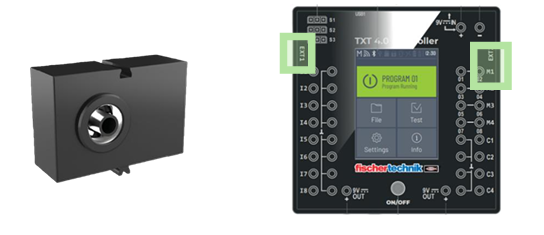
Programming Blocks
| Block | Function |
|---|---|
 |
Sets the RGB sensor LEDs to turn off automatically after a set time. |
 |
Sets the sensor’s measurement duration (e.g. 40 ms). |
 |
Returns how many RGB sensors are connected. |
 |
Reads the detected color in HEX, RGB and etc.* |
 |
Checks if a specific RGB or HSV value equals a given number.* |
 |
Sets sensor LEDs to a given brightness (0–255). |
 |
Checks if a specific LED’s brightness equals a given value. |
 |
Checks the specific predefined color. |
*Note: Here’s a short explanation for each color format:
• HEX – Color as a hex code (e.g. #FF00FF).
• RGB – Full RGB values (e.g. 255, 0, 255).
• RGB red – Only the red channel (0–255).
• RGB green – Only the green channel (0–255).
• RGB blue – Only the blue channel (0–255).
• HSV – Full HSV values (hue, saturation, value).
• HSV hue (°) – Hue angle (0–360°).
• HSV saturation (%) – Saturation level (0–100%).
• HSV value (%) – Brightness/value (0–100%).
• White value – Detected white light level.
Electrical characteristics
| Specification | Value |
|---|---|
| Weight | 14 g |
| Supply voltage | 3.3 V |
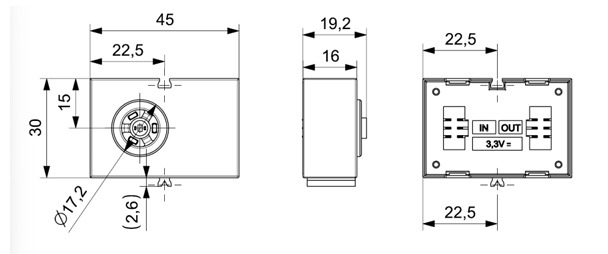
Dimensions
Connection Tips
The RGB color sensor can be connected to the EXT1 or EXT2 port. Example of connection to the TXT 4.0 Controller:
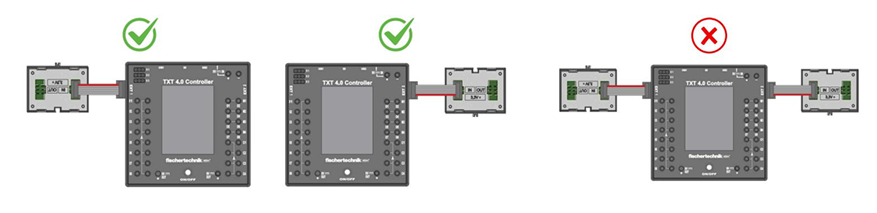
Up to 8 RGB color sensors can be connected.
Additional color sensors are connected at their IN connection to the OUT connection of a previous color sensor.

Power the controller only after connecting all sensors. Otherwise, connecting chained sensors later may cause a crash of the TXT 4.0 controller.
Sample Code
Connection: Connect the RGB Color Sensor to the EXT1 port of the TXT 4.0 Controller.
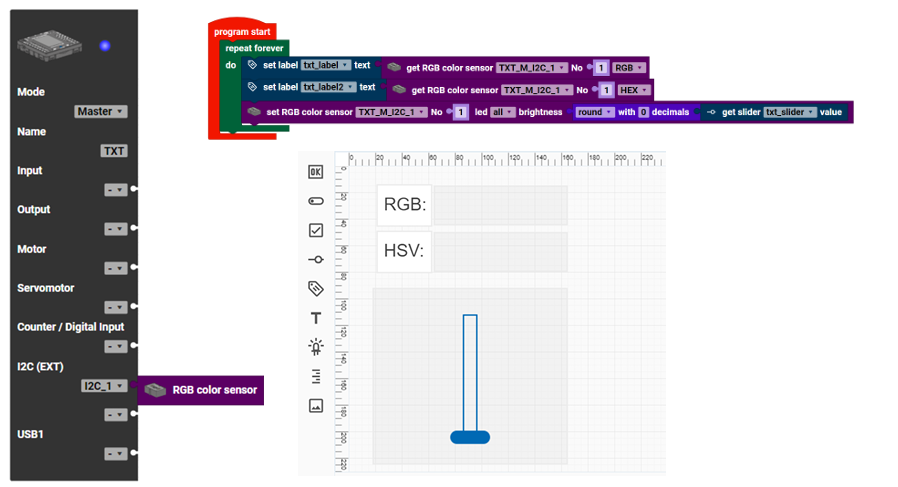
Result: The HSV and RGB values will be displayed on the TXT 4.0 Display.
The slide bar on the display can adjust the sensor light.